
ios 极光推送接收数据
ios 极光推送
1.安装插件
// 需要申请极光推送的API_KEY
cordova plugin add jpush-phonegap-plugin --variable API_KEY=f1a6d92c82e61f59a7ffabcb
1
2
2
2.配置
android使用,直接安装,不用去修改什么,然后加上 //启动极光推送服务
window.plugins.jPushPlugin.init();
//调试模式,这样报错会在应用中弹出一个遮罩层显示错误信息
window.plugins.jPushPlugin.setDebugMode(true);
1
2
3
2
3
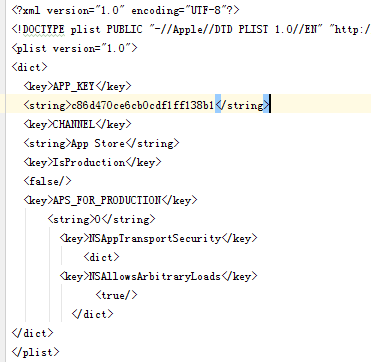
ios:需要在推送插件ios目录下的PushConfig.plist的文件中加上
<key>APS_FOR_PRODUCTION</key>
    <string>0</string>
    <key>NSAppTransportSecurity</key>
        <dict>
    <key>NSAllowsArbitraryLoads</key>
        <true/>
        </dict>
1
2
3
4
5
6
7
2
3
4
5
6
7
如图所示
3.接收数据
使用jpush.openNotification 事件,事件里会传递 event 参数进来,在安卓平台有专门的 extras 方法解析,而 iOS 平台就直接在 event 这个参数上。ios在XCode中的Capabilities中打开push notification,background modes中的remote notification选项
//点击通知栏的回调,在这里编写特定逻辑
document.addEventListener("jpush.openNotification", onOpenNotificationIOS, false);
1
实现函数,打开通知跳转到url指定的页面,在app内部打开
function onOpenNotificationIOS(event){
    if(device.platform==='Android'){
    var extraData = window.plugins.jPushPlugin.openNotification.extras['cn.jpush.android.EXTRA'];
    cordova.ThemeableBrowser.open(extraData.url, '_blank', {
        statusbar: {
            color: '#009ed6'
        },
        toolbar: {
            height: 44,
            color: '#009ed6'
        },
        title: {
            color: '#ffffff',
            showPageTitle: true
        },
        backButton: {
            wwwImage: 'images/back.png',
            wwwImagePressed: 'images/back_pressed.png',
            wwwImageDensity: 2,
            align: 'left',
            event: 'backPressed'
        },
        backButtonCanClose: true,
        disableAnimation:true
        }).addEventListener('backPressed', function (e) {
            $ionicHistory.goBack();
        }).addEventListener(cordova.ThemeableBrowser.EVT_ERR, function (e) {
        }).addEventListener(cordova.ThemeableBrowser.EVT_WRN, function (e) {
        })
    }else {
    extraData = event;
    cordova.ThemeableBrowser.open(extraData.url, '_blank', {
        statusbar: {
        color: '#009ed6'
        },
        toolbar: {
        height: 44,
        color: '#009ed6'
        },
        title: {
        color: '#ffffff',
        showPageTitle: true
        },
        backButton: {
        wwwImage: 'images/back.png',
        wwwImagePressed: 'images/back_pressed.png',
        wwwImageDensity: 2,
        align: 'left',
        event: 'backPressed'
        },
        backButtonCanClose: true,
        disableAnimation:true
    }).addEventListener('backPressed', function (e) {
        $ionicHistory.goBack();
    }).addEventListener(cordova.ThemeableBrowser.EVT_ERR, function (e) {
    }).addEventListener(cordova.ThemeableBrowser.EVT_WRN, function (e) {
    })
    }
}
1
2
3
4
5
6
7
8
9
10
11
12
13
14
15
16
17
18
19
20
21
22
23
24
25
26
27
28
29
30
31
32
33
34
35
36
37
38
39
40
41
42
43
44
45
46
47
48
49
50
51
52
53
54
55
56
57
58
59
2
3
4
5
6
7
8
9
10
11
12
13
14
15
16
17
18
19
20
21
22
23
24
25
26
27
28
29
30
31
32
33
34
35
36
37
38
39
40
41
42
43
44
45
46
47
48
49
50
51
52
53
54
55
56
57
58
59
4.注意点
推送ios
打的是开发者包,那么极光推送的时候就选择开发环境推送
打的是app store的包,就选择生产环境推送
ios,android单独的发送吧