
cordova调试工具GapDebug的使用,借鉴他人
cordova调试工具GapDebug的使用 官网:
1.修改cordova下的config.xml
修改namespace
<widget xmlns="http://www.w3.org/ns/widgets" xmlns:gap="http://phonegap.com/ns/1.0" xmlns:android="http://schemas.android.com/apk/res/android" id="me.app.id" version="1.0.0">
在config.xml下面加下
<gap:config-file platform="android" parent="/manifest"> <application android:debuggable="true" /> </gap:config-file>
在platforms/android/AndroidManifest.xml里的application字段加上debuggable属性:
<manifest> .... <application android:debuggable="true" /> .... </manifest>
中间会出现这个问题 GapDebug Problem loading url: http://chrome-devtools-frontend.appspot.com/serve_rev/@189455/189455.manifest Status code: 0
解决方法:
注意:正常情况下,此时就可以调试了,但是因为googe的网站chrome-devtools-frontend.appspot.com被GFW墙了,所以还是不行,怎么办呢?当然是让他能访问了。
本机配置hosts:C:\Windows\System32\drivers\etc\hosts
# 添加此项
220.255.2.153 chrome-devtools-frontend.appspot.com
2
cmd窗口中,ping已经可以ping通了,但是浏览器上直接访问网址访问不了,shit,怎么回事儿?突然灵光乍现,google都https化了,难道http不行,https可以,试一下,果然可以访问了。
https://chrome-devtools-frontend.appspot.com/serve_rev/@eb37b99908e3a6290792690b6eb4e4de2da8f374/eb37b99908e3a6290792690b6eb4e4de2da8f374.manifest
但是GapDebug还是提示:
http://chrome-devtools-frontend.appspot.com/serve_rev/@eb37b99908e3a6290792690b6eb4e4de2da8f374/eb37b99908e3a6290792690b6eb4e4de2da8f374.manifest访问不了,怎么配置GapDebug访问用https呢?
看到了,是直接调用的chrome.exe,那就是说配置 chrome,访问http的时候强制访问https即可了,怎么弄?百度一哈!
chrome中输入:
chrome://net-internals/
然后选择:HSTS
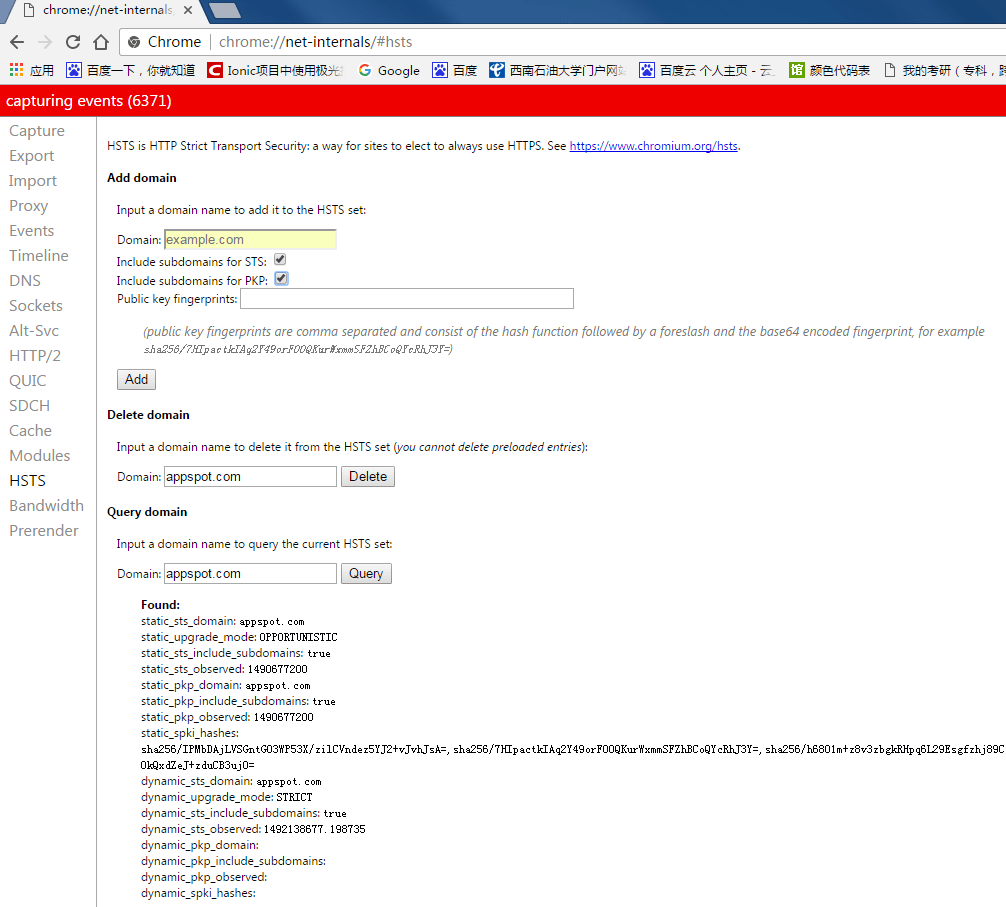
使用Google的https搜索的时候,我们会发现搜索结果虽然可以显示,但是有时候结果网页快照却无法打开。这里的原因是网页快照结果链接往往使用的是http的方式打开,打开Chrome,在地址栏输入chrome://net-internals/之后,在HSTS选项卡下的Domain中输入appspot.com,选项框也打上勾,然后点击Add按钮,即可强制快照以HTTPS方式打开。设置完成之后,访问appspot.com时,就强制访问https了。GapDebug也可用了。OK!
mac下使用GapDebug
手机端设置:
设置-safari-Web检查器 启用
设置-隐私与安全性-不跟踪 取消
Safari设置:
Preferences-Advanced-Show Develop menu in menu bar 启用
重新连接iphone与mac,
打开调试:
可以使用chrome或safari进行调试.
通过GapDebug-Open Debug Tools或
选择Safari-Develop 找到选择的设备,点开正在调试的Cordova程序。
2
3
4
5
6
7
8
9
10