
修改mysql数据库密码
方式一
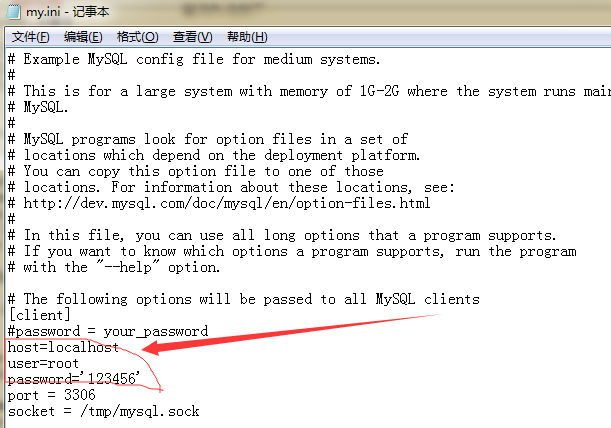
直接在my.ini文件中加上这几句
host=localhost
user=登录名
password='登录密码'
1
2
3
2
3
--- Launch phpMyAdmin
When starting phpMyAdmin, you will be asked for a user name and password.
After installing Wampserver 3, the default username is "root" (without quotes) and there is no password, which means that you must leave the form Password box empty.
There will be a warning:
You are connected as 'root' with no password, which corresponds to the default MySQL privileged account. Your MySQL server is running with this default, is open to intrusion, and you really should fix this security hole by setting a password for user 'root'.
This is not a problem as long as access to Phpmyadmin remain locally.
However, some web applications or CMS asking that the MySQL user has a password. In which case, you will create a user with password via the PhpMyAdmin Accounts Users tab.

--- Using the menus and submenus of Wampmanager
Do not use the keyboard to navigate through the menus and submenus of Wampmanager icon.

At this time, phpsysinfo3.2.3 and sqlbuddy1.3.3 are incompatible with PHP 7.0.0
1
2
3
4
5
6
7
8
9
10
11
12
2
3
4
5
6
7
8
9
10
11
12
方式二
问题:1130 Host 'localhost' is not allowed to connect to this MySQL server
1.首先停止mysql服务,如果不会可以直接停止所有wampserver。
2.然后打开一个命令行窗口,切换到mysql的安装目录,例如我的路径是:
cd C:\wamp\bin\mysql\mysql5.1.36\bin
mysqld --skip-grant-tables
// 不要关闭CMD,随它放着
// 然后第一次可能会弹出对话框,允许访问
1
2
3
4
2
3
4
3.再打开一个命令行窗口
cd C:\wamp\bin\mysql\mysql5.1.36\bin
mysql -u root -p
输入密码
1
2
3
2
3
// 数据库命令行操作
use mysql;
//delete from user where user='root';这个还是不要 利用drop user 'root'@'localhost';来删除比较好
mysql> CREATE USER 'root'@'localhost' IDENTIFIED BY '123456';  (注1)
mysql> GRANT ALL PRIVILEGES ON *.* TO 'root'@'localhost' WITH GRANT OPTION;
mysql> CREATE USER 'root'@'%' IDENTIFIED BY '123456';
mysql> GRANT ALL PRIVILEGES ON *.* TO 'root'@'%' WITH GRANT OPTION;
1
2
3
4
5
6
2
3
4
5
6
注1:
会提示:ERROR 1290 (HY000): The MySQL server is running with the --skip-grant-tables option so it cannot exe 解决办法,在命令行输入:
mysql> flush privileges;
1
如果出现
ERROR 1396 (HY000): Operation CREATE USER failed for 'root'@'localhost'
执行
drop user 'root'@'localhost';
flush privileges;
1
2
2